
For the development of the Microsoft Phone 7 and Windows 8 Store apps we used various software. Most were free or very cheap.
Visual Studio
Visual Studio 2010 was used for developing the Windows Phone 7 and the Windows 7 versions. Development was done in C# using XNA via Phone SDK.
Visual Studio 2012 was used for the Windows 8 App Store version (and would have been used for the Windows Phone 8 version) and used an open source version of XNA Game Studio 4 called MonoGame.
Team Foundation Service
A free source service hosted on Azure that fully integrates into Visual Studio, perfect for when you trash your hard disk 😁 and perfect for multi developer development particularly as I’m not fond of using GIT.
010 Hex Editor
I love this hex editor and it played a vital role in developing the emulator. I wrote my own binary template to view the TZX files. This was what started the reverse engineering of Jet Pac. The editor was also used to extract the font data, as C code, from the binary of the original game and dropped straight into the game harness code.
IDA Pro
Unfortunately unlike the full blown version of IDA Pro, the free version doesn’t support the Z80, so on cost grounds this is out of reach for a casual reverse engineer. Worse still there’s very little out there that comes close to the functionality. I did try SkoolKit disassembler but didn’t get on with it.
Audacity
This was used to convert the RAW PCM sound samples produced by the each game in the emulator into WAV files suitable for playback. It was also used to verify that the sounds were the same as the original sounds, except for speaker differences. Audacity was also used to record the cassette tapes so that I could convert them into the emulator formats: TZX and Z80.
Adobe Photoshop Elements
This was used for creating all the modern game graphics and for editing photo’s here on the blog. Not as powerful as the mighty Photoshop CS6 but it doesn’t cost £950 either!
Adobe Lightroom
Lightroom was use to catalogue the blog photographs.
Emulators
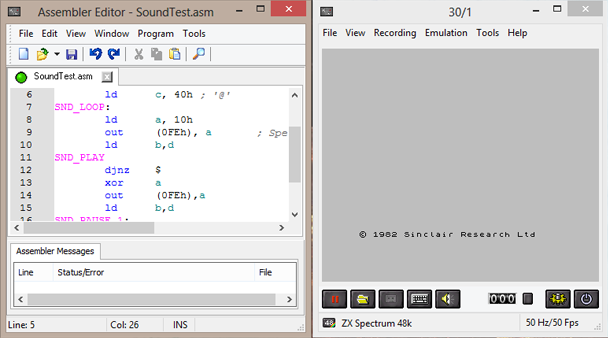
ZXSpin
The one thing that this emulator has, that others don’t, is it’s built in Z80 Assembler. It was so invaluable in getting code prototyped before running it on a real Spectrum and saved me from typing wads of hex on the ZX Spectrum keyboard! It also has a fantastic debugger ideal for aiding reverse engineering.
SpecEmu
SpecEmu is widely regarded as one of most accurate of the ZX Spectrum emulators. One option it has, which others don’t, is the ability to break point when a tape stops loading. This feature was used to create the Z80 snapshots of the Ultimate games from the tape files, TZX, as it allowed the snapshot to be saved just before decryption of the game and whilst the game was displaying the loading screen. The decryption took a couple seconds so was perfect for both showing the title screen and loading exceptionally fast.
Spectaculator
Possibly the only commercial Spectrum emulator (around £10) and, like the two previously mentioned emulators, this had a unique feature too. That was the ability to communicate with a real ZX Spectrum over an RS232 cable via an Interface one. This was used to aid testing the emulator against real hardware.