
Like most games, Ultimate’s games only do three things:
- Receive input
- Change pixel colours on a bitmap
- Play sound
Emulating the graphics was largely trivial, but the sound was far more problematic. To make sounds on the ZX Spectrum, the developer would literally just switch the power to the internal speaker very quickly, on and off. There were no sound samples per se and all sound was created on the fly.
Prior to Microsoft XNA Game Studio 4, there was no ability in XNA to create sounds on the fly like the Spectrum. But that changed when DynamicSoundEffectInstance was introduced. DynamicSoundEffectInstance pretty much imitates a speaker. You can simply pass it a buffer of 1’s (on) and 0’s (off) and the Spectrum sounds would be nicely emulated. That should have been it, however I noticed that the API submitting the sound to the ‘speaker‘ was very CPU intensive. To make matters worse the emulator was calling it 50 times a second! So on devices where CPU was limited, this caused the sound to splutter and the games to slow down. Not great.
Okay so to get around this CPU issue, the API had to be called far less frequently or not at all.
I went on to buffer up the sound as much as possible before the player noticed the sound was lagging behind the gameplay. After I got it perfect on the Windows Phone 7, I noticed to my dismay, that the API was missing on MonoGame, the replacement game engine for XNA.
The whole dynamic side of sound creation in MonoGame was not ideal… I needed to move away from using this set of APIs and get the CPU usage to plummet.
The solution was very simple and elegant…
Given this game harness was to be used for only the Ultimate games I could cheat. As an example, PSSST has just nine sounds and two tunes. These were easy to find in the assembly code as they all called the same sub-routine.
Below is the assembly language routine that was used to play the sound when a bug got stunned.
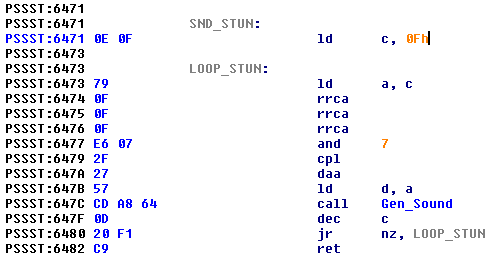
Each sound is played by the emulator, but rather than submitting the sound to the API to be played, they were saved to disk in raw PCM format. PCM format is the one that the ZX spectrum uses. These were converted via Audacity to WAV files and then compiled into the game.
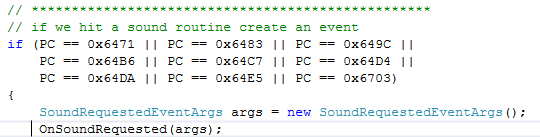
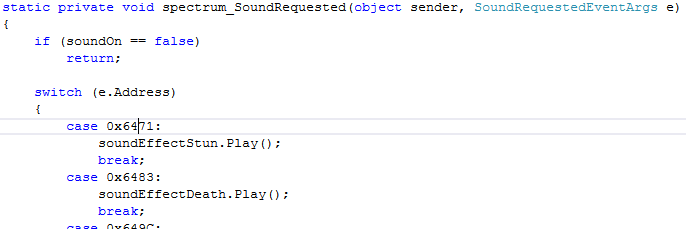
I made a note of whereabouts in the original code the sound would have played (0x6471) and as that instruction was hit I created an event to fire and play the corresponding WAV file.
Calling the event:
Handling the event and playing the sound:
This meant the games now played perfect sound every time with zero latency. With almost zero CPU usage this also meant the games were far easier to port as I no longer needed these troublesome APIs. Win, win!