
The Spectrum has a 16K ROM. The ROM being the primitive operating system (monitor) for the computer, one of the first tasks was to reverse engineer it so a complete understanding of the machine could be gleaned. The exercise was largely trivial as it was well documented, as shown here in The Complete Spectrum ROM Disassembly.
The following snippet of the Spectrum ROM is for setting the border colour:
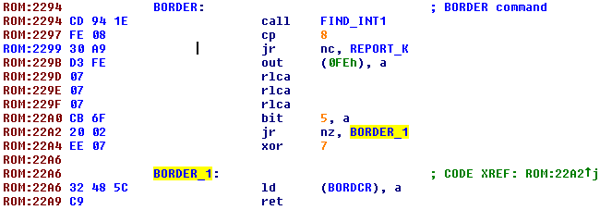
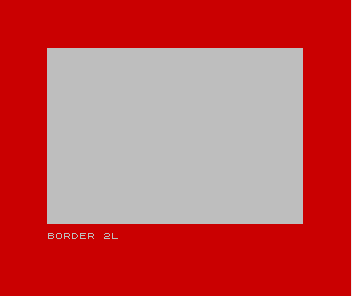
The above code would have been executed if the border was changed via the BORDER command, e.g. BORDER 2 would change the border to red.
At the begining of the project, it was not known what would become of the emulator. The Spectrum ROM is the Intellectual Property (IP) of Sinclair (Amstrad -> Pace -> Sky) and although Amstrad had previously allowed inclusion of the ROM for emulators, it was deemed risky to include it, so we wanted it removed.
The Stamper brothers came from a background of making games for coin-op arcade games. This background is reflected in their code. In the 12 games that I looked at the Spectrum ROM is barely touched, making the removal of it from the emulator fairly easy.
Initially, to remove the ROM, zero’s were placed in each of the 16365 ROM locations. Some of the games were not behaving correctly though and this turned out to be because Ultimate used the ROM to help generate random numbers. Rather than zero, it was filled with random bytes instead.
On the Spectrum every 20ms an interrupt occurs and the game is temporarily stopped so that the keyboard can be read and for the frame counter to be updated. To remove the ROM, this interrupt had to be faked by the emulator itself. This was a bit of a pain as the keyboard decoding routine was fairly complex and almost every possible keyboard combination took a differing amount of time to execute. This was something that had to be laboriously tracked. To get around this, a trace of the keyboard routine was taken when no key was pressed and this was timed… 915 Ts if I remember correctly. This value was then hard coded, and each of the games only allowed the Kempton Joystick to be used instead. This gave accurate timing and was simple to implement.
However, there were a few oddities
For example, Lunar JetMan would jump into the interupt routine which no longer existed, so the RST instructions had to be rewritten to jump to the fake emulator interupt instead.
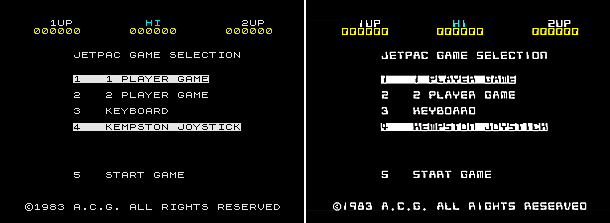
Also the Sinclair ROM font was used in the first five of the Ultimate games. So when the ROM was taken out the text couldn’t be displayed. Thankfully, that was easy to fix. We could borrow an Ultimate font from one of their other games and then use it to overwrite the old Sinclair ROM font.
Here’s the cross reference table:
|
Game |
Cookie |
PSSST |
JetPac |
Sabre Wulf |
Tranz Am |
|
Character Set |
GunFright |
GunFright |
JetMan |
NightShade |
JetMan |
Top row: games using the ROM font.
Bottom row: substituted character set from other Ultimate game.
You can see the visual difference here on the JetPac game selection screen. The original font is on the left and the Lunar JetMan font is on the right.
And finally, PSSST had an oddity which took a long time to surface.
When a level in PSSST is completed a tune plays but it did not play in the PSSST app. Plus the app didn’t crash either… what was going on?

This goes back to the fact that the Stamper’s probably didn’t use Spectrums to develop the games but instead used Apple IIs. The above code shows that the game is checking if the Beeper ROM routine, which plays the sound, is present and correct. If it isn’t, it would pause the game for 6 seconds and then continue without playing the sound, so no tune and no crash. This was much trickier to solve.
Implementing the Spectrum beeper routine would be a bit of a faff, so instead it would be easier to cheat by pre-recording the two tunes and hooking the SoundWait function to play the correct tune. The original 6 second delay was not long enough though, so the tune was still playing when the next level started! The correct value had to be poked into the PSSST code to get around this.